
Download BSE APP – BSE APP, Banco Santiago del Estero, mobile banking, secure banking, financial services, CBU, online banking, mobile app, transaction history, transfer money, pay taxes, recharge phone, fixed-term deposits, Visa BSE, Mastercard BSE, loan request, virtual token
Overview
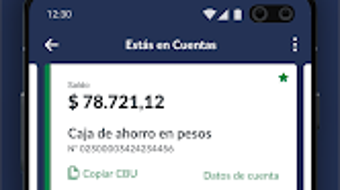
The BSE APP, developed by Banco Santiago del Estero, is a mobile banking application designed to deliver essential financial services directly to users via their Android devices. The app enables individuals to manage their banking needs remotely, offering functionalities such as checking account balances, viewing transaction history, and accessing CBU details. It supports real-time operations including instant transfers and loan requests, providing users with immediate access to financial tools.
The application also facilitates the management of fixed-term deposits, allowing users to monitor interest rates and account status. Additionally, cardholders can review their Visa BSE and Mastercard BSE details, including available credit, limits, and statements. Users can also pay taxes and services and recharge mobile phones directly through the app.
The solution is tailored for individuals seeking a convenient, secure, and efficient way to interact with their bank without visiting a physical branch. The app aims to simplify daily financial tasks by consolidating multiple services into a single platform.
Key Features & Capabilities
- CBU and Account Access: Users can instantly view their CBU and account balances, enabling quick verification of financial details.
- Transaction History: A comprehensive record of past transactions is available for review, supporting financial tracking and reconciliation.
- Instant Transfers: The app allows users to send money in real time, enhancing convenience for personal and business payments.
- Loan Request Functionality: Pre-approved loan options are accessible directly through the app, streamlining the borrowing process.
- Fixed-Term Deposit Management: Users can monitor and manage their fixed-term deposits, including interest rate information.
- Card Management: Full visibility into Visa BSE and Mastercard BSE accounts, including credit limits, available balances, and statements.
- Bill and Tax Payments: The app supports direct payment of taxes and recurring services, reducing the need for third-party platforms.
- Mobile Recharge: Users can top up their mobile phone balance directly from the application.
- Virtual Token Authentication: Identity verification is secured through a virtual token, minimizing the need for physical ATM visits.
User Interface, Workflow & Performance
The BSE APP features a clean and intuitive user interface, optimized for Android devices to ensure ease of navigation. Core functions are organized in a logical structure, allowing users to access essential services with minimal steps. The workflow is designed to minimize friction during critical operations such as fund transfers and loan requests.
Users can quickly locate features through clearly labeled menus and icons. While specific performance metrics such as CPU or RAM usage were not disclosed, the app’s functionality suggests a responsive design suitable for standard Android smartphones. The developer did not provide additional system requirements or performance benchmarks.
General software behavior patterns indicate that the application is likely optimized for smooth operation on devices meeting basic Android standards. Stability and reliability are expected to align with typical mobile banking applications, though real-world performance may vary depending on device specifications and network conditions.
Compatibility & System Requirements
The BSE APP is designed for Android operating systems and is currently available in version 1.0.0. The installation package is 35.7 MB in size, indicating a lightweight footprint suitable for most Android devices. The developer did not specify exact system requirements, such as minimum Android version, RAM, or processor specifications.
Compatibility information was partially provided, leaving users to rely on general Android compatibility assumptions. Users should ensure their device supports the latest Android updates to maintain optimal performance and security. The developer did not disclose whether the app is compatible with tablets or other Android-based devices.
Platform compatibility information is limited to Android, and no details were provided regarding future updates or support for additional operating systems.
Pros and Cons
Pros
- Offers a wide range of banking services in a single mobile application.
- Supports real-time transactions, including instant transfers and loan requests.
- Provides secure access to account details, cards, and deposits via virtual token authentication.
- Enables users to pay taxes, services, and recharge mobile phones directly within the app.
- Free to download and use, reducing entry barriers for users.
- Designed with a user-friendly interface for efficient navigation.
Cons
- Compatibility details beyond Android were not specified.
- Exact system requirements, including minimum Android version, were not provided.
- Performance behavior under heavy usage or low network conditions was not documented.
- Limited information on update frequency or long-term support plans.
- Availability is restricted to Android devices, excluding iOS and other platforms.
FAQ Section
Is the BSE APP available for iOS devices?
The developer did not specify whether the app is available for iOS. Currently, the app is confirmed for Android only.
Is the BSE APP secure to use?
The app uses a virtual token for identity validation, enhancing security. However, specific encryption protocols or data protection measures were not detailed in the provided information.
How often is the BSE APP updated?
Update frequency was not specified by the developer. Users should check the app store for the latest version and release notes.
Can I use the BSE APP offline?
The app requires an active internet connection for most functions, including transactions and data retrieval. Offline functionality was not mentioned.
What type of license does the BSE APP have?
The app is offered free of charge, but the specific license type was not disclosed in the provided details.
Final Thoughts
The BSE APP presents a robust and accessible solution for users of Banco Santiago del Estero seeking a modern, mobile-first banking experience. With its comprehensive suite of financial tools—ranging from account management and instant transfers to loan requests and tax payments—it effectively consolidates essential banking services into a single, secure platform. The inclusion of virtual token authentication strengthens trust and reduces reliance on physical banking visits.
While the app is currently limited to Android and lacks detailed system specifications, its lightweight size and free availability make it accessible to a broad audience. Users who prioritize convenience, security, and real-time financial control will find significant value in this application. The absence of detailed technical documentation does not detract from its practical utility, especially for those already within the bank’s service network.
For individuals looking to manage their finances on the go, the BSE APP delivers a reliable and efficient experience.
Download BSE APP now






.png)
